How to Recover Your Hacked Facebook Account: A Complete Guide
Introduction
In today’s digital age, having a Facebook account is almost essential for staying connected with friends and family. However, the unfortunate reality is that many users fall victim to hacking attempts, compromising their accounts. If you’re worried that your Facebook account might have been hacked, you’re not alone. This guide will walk you through the signs of a hacked account, immediate actions to take, and a detailed recovery process. With the right steps, you can regain control of your account and secure it for the future.
Signs Your Facebook Account is Hacked
It’s important to recognize the signs of a hacked Facebook account as soon as possible. Here are some common indicators:
- Unrecognized Login Activity: You may notice logins from unfamiliar locations or devices.
- Unexpected Password Changes: If you can’t log in because your password has changed, your account may be compromised.
- Messages Sent Without Your Knowledge: Friends might inform you that they received strange messages from your account.
- Changes in Profile Information: Check if your name, email, or phone number has been altered without your permission.
- Friends Added or Removed: If you notice new friends that you didn’t add or old friends that you didn’t remove, it’s a red flag.
- Unfamiliar Apps Connected: Review your app settings and see if there are any unfamiliar applications linked to your account.
- Login Alerts: Facebook often sends alerts for logins from new devices or browsers. If you receive these and don’t recognize them, act quickly.
Immediate Steps to Take
If you suspect that your Facebook account is hacked, you must act quickly. Here are urgent actions to take:
- Try to Log In: Attempt to log into your account using your usual password.
- Use ‘Forgot Password’: If you can’t log in, click on ‘Forgot Password?’ to initiate a recovery process.
- Check for Suspicious Activity: If you regain access, check for any suspicious posts or messages.
- Alert Friends: Inform your friends that your account may have been compromised.
Complete Recovery Process
Follow these detailed steps to recover your hacked Facebook account:
Step 1: Visit the Facebook Login Page
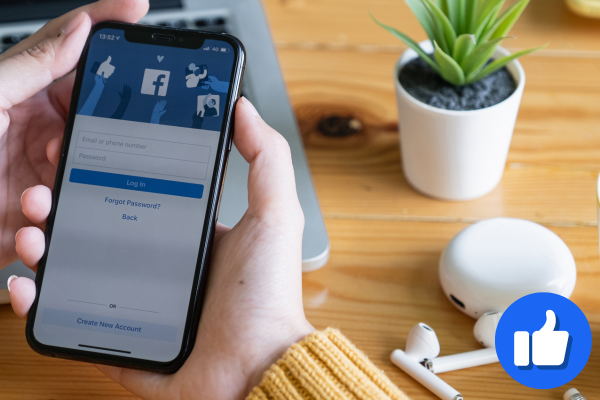
Go to the Facebook login page.
Step 2: Click ‘Forgotten Password?’
Under the password field, click on ‘Forgotten Password?’.
Step 3: Enter Your Details
Type in your email address or phone number linked to your account. Click ‘Search’.
Step 4: Choose Recovery Method
You’ll see options for receiving a code via SMS or email. Choose your preferred method and click ‘Continue’.
Step 5: Enter the Verification Code
Check your SMS or email for the verification code. Enter it in the provided space and click ‘Continue’.
Step 6: Reset Your Password
Once verified, you’ll be prompted to create a new password. Make sure to choose a strong and unique password.
Step 7: Review Account Activity
After logging in, check your account activity, including messages, posts, and friend requests. Remove anything suspicious.
Step 8: Enable Two-Factor Authentication
Go to Settings > Security and Login > Two-Factor Authentication. Follow the prompts to secure your account further with SMS verification or an authenticator app.
How to Secure Your Account After Recovery
Once you have regained access, follow these tips to strengthen your account security:
- Change Your Password: Use a strong password that includes letters, numbers, and symbols.
- Enable Two-Factor Authentication: This adds an extra layer of security by requiring a code sent to your phone.
- Review Authorized Devices: Under Settings > Security and Login, review devices that have access to your account.
- Be Cautious of Phishing: Don’t click on suspicious links or provide personal information via messages.
- Use a Password Manager: Consider using a password manager to generate and store strong passwords.
- Regularly Update Your Password: Change your password every few months to maintain security.
- Monitor Account Activity: Keep an eye on your account for any unusual activity.
Common Mistakes to Avoid
To ensure your account remains secure, avoid these common mistakes:
- Using the same password across multiple platforms.
- Ignoring security alerts from Facebook.
- Not enabling two-factor authentication.
- Clicking on suspicious links or ads.
- Sharing your password with anyone, even friends.
FAQ Section
- What if I can’t access my email or phone number?
If you can’t access your email or phone, click on ‘No longer have access to these?’ during the recovery process. Follow the instructions to verify your identity. - Can I recover a deleted account?
No, once a Facebook account is deleted, it cannot be recovered. - How long does the recovery process take?
Typically, the recovery process is immediate, but it may take longer if additional verification is needed. - Is two-factor authentication necessary?
Yes, it is highly recommended for additional security. - What should I do if I see a friend’s account hacked?
Inform them immediately and advise them to follow these recovery steps. - Can I recover my account using Aadhaar or PAN?
Facebook does not directly use Aadhaar or PAN for recovery, but they may require identity verification. - What should I do if I receive a suspicious link?
Do not click on it. Report it to Facebook and delete the message.
Conclusion
Recovering a hacked Facebook account can be stressful, but by following the steps outlined above, you can regain control and secure your account against future threats. Remember to regularly update your password and be vigilant about your online security. Prevention is always better than cure, so take proactive measures to safeguard your account.